Physical Address
304 North Cardinal St.
Dorchester Center, MA 02124
Physical Address
304 North Cardinal St.
Dorchester Center, MA 02124

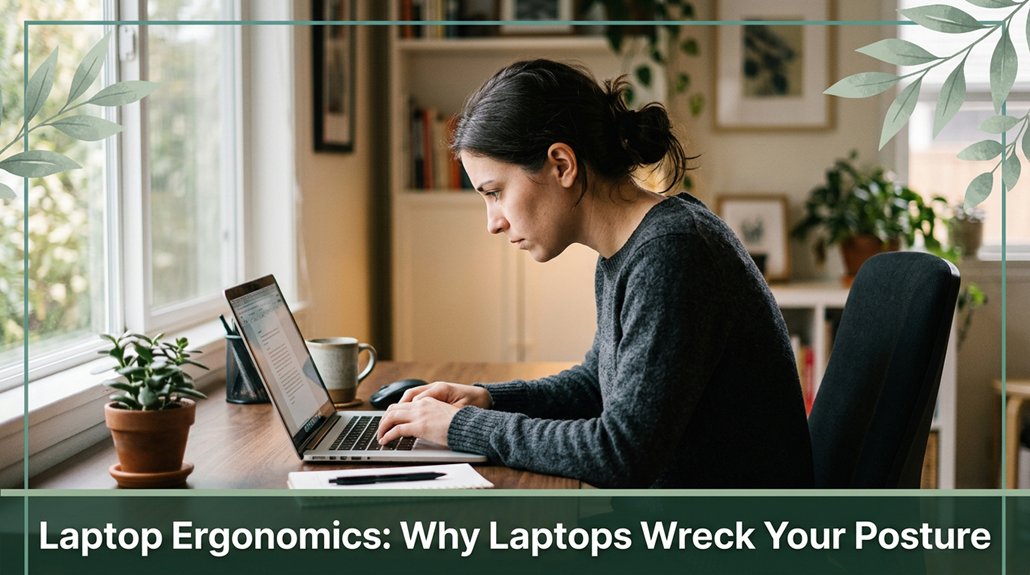
Look, you probably know that leaning into your screen and slouching makes your neck, shoulders, and back scream by the end of the day. Your laptop’s design doesn’t help the screen is often too low and the keyboard too tight, forcing you into awkward angles. That forward head position, cramming your neck muscles with extra weight, is a recipe for pain. Stick around, and you’ll find simple fixes to keep you comfortable and save your posture long-term.
This article contains affiliate links. If you purchase through them, I may earn a small commission at no extra cost to you. I only recommend products I genuinely believe in.
You’ve probably felt it your neck creeping forward, shoulders rising toward your ears, and that sluggish, heavy feeling in your lower back after a few hours at your desk. These symptoms are common signs of poor laptop ergonomics, which can develop into more serious musculoskeletal issues if not addressed.
When you lean into your screen, your neck flexes forward. According to OSHA ergonomic guidelines, this position puts almost 60 pounds of strain on your cervical spine much more than the weight of your head itself, which averages about 10 to 12 pounds. This excessive load can lead to neck strain, cervical disc compression, and tension headaches.
Over time, these strain patterns may contribute to conditions like cervical kyphosis or early degenerative changes. Your muscles stretch, and your discs get compressed, causing discomfort and fatigue. Limited movement options in small workspaces can exacerbate these postural issues, making it harder to adopt and maintain healthy positions.
To compensate for poor positioning, your body often rounds your shoulders and hunches your upper back, leading to thoracic kyphosis and potential shoulder impingement. These postural adaptations can increase the risk of developing chronic pain, muscle tension, and reduced mobility. Employing ergonomic principles such as proper monitor placement and supportive seating can significantly improve your posture and reduce discomfort.
All these issues highlight the importance of maintaining proper laptop posture. Ensuring your screen is at eye level, your back is well-supported, and your feet are flat on the ground can help prevent these common ergonomic problems.

All right, here’s where things get interesting: laptop design flaws are sneaky troublemakers that make maintaining good posture almost impossible. You’ve probably noticed that when you try to set your laptop screen at eye level, your keyboard ends up too high, forcing your shoulders to hike up and your wrists to bend awkwardly.
According to OSHA ergonomic guidelines, this can lead to shoulder strain and increased risk of repetitive strain injuries such as carpal tunnel syndrome. Conversely, if you lower the screen for comfortable viewing, your neck is left flexed downward, with your head jutting forward which research on spinal biomechanics suggests can cause thoracic kyphosis and neck pain.
This neck flexion increases strain on the cervical and upper thoracic regions, potentially leading to musculoskeletal discomfort over time. People who sit for more than 6 hours a day should be especially mindful of these posture issues, as prolonged poor alignment can contribute to chronic neck and shoulder pain.
Extended sitting durations increase the likelihood of developing musculoskeletal issues, making ergonomic awareness even more critical. Compact keyboards often pack everything too close together, making your arms and wrists bend and twist into uncomfortable positions.
Research indicates that wrist deviations exceeding 10-15 degrees can increase the risk of developing repetitive strain injuries like carpal tunnel syndrome. No matter how much you rearrange or shuffle your body, the integrated design traps you in a constant tug-of-war between neck and limb positioning.
In essence, a laptop’s shape and design inherently force your body into compromised postures that compromise musculoskeletal health, highlighting the need for ergonomic separation between the screen, keyboard, and input devices. Understanding the device design limitations can help inform better workspace adjustments to mitigate these issues.

When you slouch at your laptop, it’s like inviting a mini chaos scene into your body right then and there. You probably notice it first in your neck or shoulders tightness, stiffness, and that ache that appears faster than your coffee cools. That’s because leaning forward increases the load on your cervical spine from about 10 pounds to nearly 50 pounds when your head pitches downward, according to OSHA ergonomic guidelines.
This added strain causes your neck muscles such as the trapezius and sternocleidomastoid to tense and fatigue more quickly, leading to discomfort commonly called “tech neck.” Research on spinal biomechanics suggests that this forward head posture can also contribute to misalignments in the cervical and upper thoracic regions, potentially leading to chronic pain or nerve compression issues if maintained over time.
Posture correction can help prevent these issues from becoming long-term problems. Now, your upper back isn’t safe either. Slouching rounds your shoulders, stressing the thoracic and scapular stabilizer muscles and the costovertebral joints, which may cause localized pain or stiffness.
Additionally, slouching causes the thoracic kyphosis angle the curve in your upper back to increase beyond optimal ranges, leading to poor posture habits. Although slouching may feel comfortable initially, it’s a fast track to muscle fatigue, joint stress, and long-term musculoskeletal discomfort.
Therefore, maintaining proper ergonomic alignment like sitting with your back supported and your computer at eye level is crucial to prevent these issues from developing. Incorporating ergonomic principles helps sustain healthy posture during prolonged desk work.

All right, so you’ve been sitting slouched at your laptop for what feels like forever, and somewhere along the line, that bad posture becomes more than just a temporary discomfort. Honestly, it’s a slow march toward real health issues.
If you keep it up, you’re risking chronic neck, back, and shoulder pain think of it as kindling for long-term spinal degeneration. The forward head posture, where your cervical spine aligns in an extended position (often exceeding 15 degrees forward from neutral), increases the load on your neck discs according to research on spinal biomechanics suggests, this can elevate the risk of herniation and nerve impingement.
Over time, poor ergonomics can weaken your core muscles, which provide vital support to your lumbar spine, leading to instability and increased susceptibility to lower back pain. Additionally, slouching and thoracic kyphosis (excessive rounding of the thoracic spine) compress your lungs, reducing respiratory efficiency, and may impair circulation by constricting blood flow.
Prolonged poor posture can also contribute to conditions like sciatica or carpal tunnel syndrome by increasing pressure on peripheral nerves. People who sit more than 6 hours a day are particularly at risk, especially if they neglect ergonomic adjustments such as proper monitor height, chair support, and periodic movement.
Prolonged device use has been linked to increased muscle strain and fatigue, further compounding these issues. Incorporating ergonomic principles, like adjustable furniture and proper workstation setup, can greatly reduce these risks and promote healthier posture habits. The best approach is to maintain an optimal ergonomic setup: your monitor should be at eye level, your chair should support your lumbar curve, and your feet should rest flat on the floor.

Number one on your list to keep headaches and aches at bay is setting up your laptop properly. First, place your screen on a firm surface or a laptop stand so your eyes can focus on the top third of the display, which research on visual ergonomics suggests is the optimal viewing zone to reduce eye strain.
Keep the screen about an arm’s length away approximately 20 to 30 inches (which helps prevent eye fatigue and maintain clarity). Adjust the angle of the screen to nearly vertical, aligning it with your workspace lighting to minimize glare and avoid neck tilting, which can lead to thoracic kyphosis.
Use an external keyboard and mouse positioned so that your elbows remain close to a 90-degree angle, with wrists in a straight, neutral position to prevent carpal tunnel syndrome. Many ergonomists recommend maintaining this ergonomic handshake position to reduce nerve compression in the wrists.
Sit on a chair where your thighs are parallel to the floor to support proper sacral and lumbar alignment, and ensure your lower back receives adequate support, as proper lumbar support reduces the risk of lower back pain and sciatica.
Implementing these ergonomic principles can significantly improve your comfort and reduce the risk of persistent musculoskeletal issues, especially considering that poor posture from extended laptop use can contribute to chronic neck and shoulder pain. Paying attention to ergonomic keyboard and mouse positioning is also essential, as it can help prevent repetitive strain injuries and foster overall workstation comfort.
You’ve probably noticed it too those sneaky moments when your head slowly leans forward, your shoulders hunch up, and your back feels like it’s bearing a load it shouldn’t be. All right, here’s an easy fix.
First, keep your feet flat on the ground or on a stable footrest, as dangling feet can increase lumbar strain and impair circulation according to OSHA ergonomic guidelines. Raise your chair until your forearms are parallel to the floor (about 90 degrees of elbow flexion), and sit back fully into the backrest so your pelvis is adequately supported, which helps maintain the natural lumbar curvature. Proper chair adjustments are crucial for supporting spinal health during prolonged computer use. Additionally, ensure your chair provides lumbar support to help maintain proper spinal alignment.
Next, adjust your computer screen so the top is at eye level, ensuring your neck remains in a neutral position and avoiding that “see-saw” head tilt, which research on spinal biomechanics suggests can reduce strain on cervical and thoracic vertebrae. Aim to position the monitor approximately 20 inches (about arm’s length) from your eyes to prevent eye strain and maintain proper neck alignment.
Finally, take a break every 20 to 30 minutes to reset your posture and avoid prolonged static positioning. During these breaks, stretch your shoulders, back, and neck muscles, and consciously check your pelvic tilt and spinal curves. Incorporating ergonomic accessories like wrist rests and ergonomic keyboards can further support healthy positioning during work. Staying mindful of your ergonomic setup and movement habits can significantly reduce the risk of developing musculoskeletal issues such as upper crossed syndrome or thoracic kyphosis. Remember, consistent small adjustments make a big difference in maintaining a healthy spine while working at your laptop.
A well-designed workspace isn’t just about looking tidy; it’s about supporting your body so it doesn’t revolt after a few hours. You want your ergonomic chair to be adjusted so your feet rest flat on the floor or on a footrest, with thighs parallel to the floor and knees at a comfortable 90 degrees. According to OSHA ergonomic guidelines, this positioning helps reduce pressure on your lumbar spine and improves circulation. Ensuring correct chair height is fundamental to maintaining proper posture throughout the day.
The backrest should support your lumbar curve think of it as giving your lower back a hug and your armrests should support your forearms without lifting your shoulders. Proper armrest height prevents shoulder tension and overuse of the cervical region.
Now, your desk or keyboard should sit near elbow height, keeping your elbows at about 90 degrees, which minimizes strain on the wrist, forearm, and shoulder muscles.
When it comes to screens, position the top of the monitor at or slightly below eye level (approximately 20-30 inches away from your face), about arm’s length away, to keep your neck at a neutral position. Many ergonomists recommend this setup to prevent neck strain and preserve cervical spine health.
Support your feet with a footrest if your feet don’t naturally reach the ground comfortably. This simple adjustment helps maintain proper pelvic alignment and reduces lower back pressure.
Remember, these ergonomic principles are essential for preventing musculoskeletal disorders such as sciatic nerve issues, thoracic kyphosis, and repetitive strain injuries.
Yes, ergonomic accessories can greatly counteract poor laptop design, but they’re not magic.
They’re like masks, helping hide the issues but not fixing the bones underneath. When you elevate your screen, use an external keyboard, and support your back and feet, you’ll notice less strain.
Still, if your laptop’s built like a piece of modern art beautiful but flawed you might need a more profound upgrade.
Think of accessories as the band-aid, not the cure.
You should take a break every 30 to 60 minutes, like giving your muscles a little rescue mission before they yell at you.
Imagine your neck and back as a rubber band stretching and squishing; too long, and they’ll snap.
All right, a quick stretch, walk around, or change position, even if just for a few minutes, helps reset your posture and keeps discomfort from building up like unwelcome guests.
You’re probably noticing the signs of developing poor posture neck stiffness, rounded shoulders, maybe some tingling or pain radiating into your arms.
These happen when your muscles and joints adapt to sustained bad positions like forward head posture or slouching. Over time, your muscles get tight, your joints lose mobility, and chronic issues start building, making everyday movement feel awkward or even painful.
Take action before it’s a full-blown problem.
Yes, you absolutely can correct those postural issues with targeted exercises.
Think chin tucks to pull your head back, shoulder blade squeezes to straighten those rounded shoulders, and thoracic twists to loosen up your spine.
It’s like giving your muscles a gentle reset.
Do these regularly, and you’ll start noticing less neck strain and more ease like your posture got its act together, even after a long laptop binge.
All right, you want your workspace to work with you, not against you. Raise that laptop screen so it’s at eye level trust me, your neck will thank you and use an external keyboard and mouse to keep your elbows comfy.
Adjust your chair so your feet are flat and your back stays supported. It sounds simple, but small tweaks like these make a huge difference, helping you avoid the pain of poor posture.
Look, I get it life’s busy, and ergonomic perfection feels like just another thing to worry about. But if you’re anything like me, you’ve probably noticed that little ache sneaking in after a long day. Fixing your posture isn’t about turning every hour into a Pilates class; it’s about small shifts that prevent your body from feeling like a battered old phone cord. Because in the end, a good setup helps you enjoy the moments whether it’s work or a good barbecue with friends.





