Physical Address
304 North Cardinal St.
Dorchester Center, MA 02124
Physical Address
304 North Cardinal St.
Dorchester Center, MA 02124


Working comfortably at a coffee shop isn’t magic it’s about setting up your space wisely. You want your laptop at eye level, so grab a foldable stand; your neck will thank you later. Keep your keyboard and mouse within easy reach, and sit with your feet flat on the ground, or you might end up with back pain faster than your coffee cools.
Use a wrist support and organize your workspace so you’re not reaching for everything. Skip these tips, and discomfort will keep bothering you. Keep practicing, and soon you’ll master comfortable outside-the-home work setups.
This article contains affiliate links. If you purchase through them, I may earn a small commission at no extra cost to you. I only recommend products I genuinely believe in.
When it comes to spending hours in your favorite coffee shop, comfort isn’t just a luxury; it’s a necessity. That’s where coffee shop ergonomics come in. If your setup isn’t right, you’ll feel it such as a sore neck, back pain, or eyestrain.
You want your laptop at eye level, because looking down at the screen causes neck strain. Raise the monitor until the top of the screen is at or just below your eye level, which is typically 20 to 30 inches from your face.
Your chair should support your back and keep your feet flat on the floor; this helps maintain proper posture and reduces fatigue.
Support your back and keep feet flat to promote good posture and reduce fatigue.
Ensure your feet are resting firmly on the ground or on a footrest if needed, because this promotes good circulation and spinal alignment, preventing discomfort over extended periods.
Your keyboard and mouse should be within easy reach, approximately 16 to 20 inches from your body, so you don’t need to stretch or strain to access them.
Position your keyboard and mouse so that your elbows are close to your body and form about a 90-degree angle, because this minimizes strain on your shoulders and wrists.
Keep your wrists in a neutral position flat or slightly elevated while typing or using the mouse to prevent repetitive strain injuries.
Here’s the thing: a good ergonomic setup keeps you productive longer, because it prevents fatigue and discomfort. It also helps you avoid the ‘I’ll just sit here for 10 more minutes’ spiral, which often leads to extended poor posture.
Key ergonomic facts to remember:
Additionally, maintaining proper ergonomic positioning can reduce the risk of repetitive strain injuries like carpal tunnel syndrome, especially important for those who spend long hours working outside of a traditional office environment.
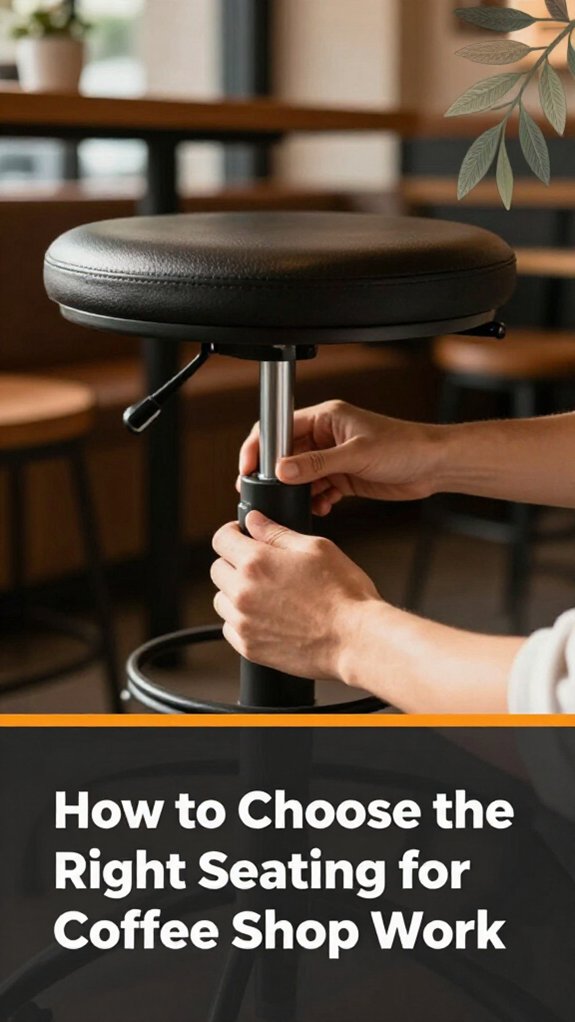
Ever tried picking a seat at a coffee shop and felt like Goldilocks nothing quite right? You sit, and your back’s squirming or the table’s too high, or maybe the chair’s so wobbling you’d think it’s auditioning for a circus act. Here’s the thing: you want a chair that supports your lower back without forcing you into a contortionist yoga pose.
Start by looking for adjustable height. Raise or lower the seat until your feet are flat on the ground and your knees form a 90-degree angle because this position promotes good circulation and reduces lower back strain.
Check for comfort: does the seat cushion feel like a cozy cloud instead of a bed of nails? A high-quality ergonomic seat cushion made from memory foam or a supportive gel layer can significantly improve comfort during long hours.
Ensure lumbar support: the chair should have built-in lumbar support that aligns with the natural curve of your lower back. If it’s adjustable, tailor it to fit snugly against your lumbar region because proper lumbar support maintains the natural inward curve of your spine and prevents slouching.
Remember, a decent seat in a coffee shop isn’t just about looks it’s about making sure your back doesn’t turn into a pretzel after an hour. Additionally, learning ergonomic guidelines can help you find the most suitable setup for your outside workspace.
Specific measurements and ergonomic tips:
Common mistakes to avoid:
There’s a good chance you’ve spent way more time than you’d like fussing over your laptop setup, only to end up with a neck cramp and a sore lower back. All right, let’s fix that.
First, your laptop should be at eye level because looking slightly down is less fatiguing on the cervical spine than looking straight ahead or upward. Rise your laptop onto a stand or place it on a stable surface so the top of the screen is at or just below your eye level.
Next, keep your elbows close to 90 degrees because maintaining an ergonomic elbow position reduces strain on your shoulders and forearms. Adjust your chair height so your elbows are at or near a 90-degree angle when your hands are on the keyboard.
Lower the monitor to just below eye level because this position minimizes neck elevation and helps prevent neck strain.
Position the keyboard and mouse so your wrists stay neutral, avoiding bending or twisting them, because neutral wrist posture reduces the risk of repetitive strain injuries like carpal tunnel syndrome.
Adjust your chair height so your feet are flat on the ground because proper foot positioning promotes overall body alignment and reduces lower back pressure.
Maintaining correct monitor placement ensures your head and neck are aligned, preventing unnecessary muscular tension.
Key Measurements & Standards:
Here’s a quick visual:
| Eye Level | Elbows at 90° | Feet Flat |
|---|---|---|
| Laptop up | Arms relaxed | Flat on ground |
| Ideal setup | Comfortable stance | Good posture |
| No cricks | No strain | No fuss |
There you go. Simple enough, right?

Organizing your coffee shop workspace isn’t just about making everything look neat although that’s a bonus. It’s about reducing strain and making your day run smoother.
First, position your laptop at eye level because looking slightly down onto a screen reduces neck strain and improves posture. Raise your monitor until the top of the screen is at or just below your eye level, which is approximately 20 to 30 inches from your face. Use an adjustable stand or stack books underneath the laptop if needed.
Keep your mouse and keyboard close because having them within arm’s reach, with your elbows relaxed and close to your sides, prevents shoulder and wrist strain. Use an ergonomic keyboard like the Logitech Ergo K860 to maintain a natural hand and wrist position. Keep your mouse within 12 inches of your keyboard to avoid overreaching.
Don’t forget to clear clutter because a tidy workspace allows fluid movement without reaching or twisting. Regularly organize cords and supplies to maintain a clean area conducive to ergonomic efficiency.
Adjust your chair height until your feet are flat on the ground, your knees are at a 90-degree angle, and your thighs are parallel to the floor. Use a seat cushion if necessary to support proper posture. Additionally, laptop stand height is crucial to keep your screen aligned correctly and prevent neck strain.
Ensure your workspace feels natural: a correctly arranged setup will help you avoid recurring aches and strain, saving you from twisting into uncomfortable positions every hour.
Maintaining these ergonomic principles promotes comfort and productivity with minimal effort.
A good set of external accessories can be a game-changer for your posture, especially when you’re trying to get through a busy day at a coffee shop.
First, grab a portable laptop stand, such as the Nulaxy Laptop Stand or Nexstand Zoom, because raising your laptop screen to eye level reduces neck strain and promotes better alignment. Raise the monitor until the top of the screen is at or just below your eye level, which typically means the top of the screen should be approximately 2 to 3 inches below eye level, depending on your height. This adjustment ensures that your neck remains in a neutral position, preventing discomfort.
Next, a small, foldable keyboard like the Logitech K380 or Arteck HB030B, and a compact mouse such as the Logitech MX Anywhere 3, can save your wrists from awkward angles. Position your keyboard and mouse so that your elbows are bent at about 90 degrees and your wrists remain straight during use.
Don’t forget a wrist support pad, like the Gel Wrist Rest from 3M or Samdi Wrist Support Pad, if you’re prone to soreness because continuous wrist positioning at awkward angles often leads to discomfort or repetitive strain injuries.
Additionally, ensure your phone or tablet is mounted on a sturdy holder, like the Lamicall Cell Phone Stand or OmniMount Universal Tablet Holder, because adjusting your device to eye level prevents you from tilting your head downward and straining your neck.
Using an external monitor arm can further help position your display for optimal ergonomics and flexibility throughout your work session.
Key Measurement Fact:
– The top of the monitor should be at or just below eye level; specifically, it should be approximately 2 to 3 inches below your eye line.
Finding the right natural light isn’t about just opening a window and hoping for the best, because proper lighting reduces eye strain and improves overall comfort.
First, look for a spot where sunlight hits the wall or table softly, not directly in your eyes or reflecting glare onto your screen. All right, avoid positioning yourself facing a big window, because flickering shadows or overly bright light cause your eyeballs to cry and increase fatigue.
Next, if possible, find a space where sunlight filters through a sheer curtain or blind, because this allows you to enjoy the benefits of natural light without being blinded by direct sunlight.
Here’s the thing: natural light varies throughout the day, so you should shift your seating accordingly.
Specific fact:
– Natural light intensity and angle change during the day consider this when choosing your workspace.
To optimize your ergonomic setup:
Remember: natural light is dynamic. Constantly reassess and shift your position during the day to maintain optimal lighting conditions, because the intensity and angle of sunlight change from morning to afternoon.
Additionally, understanding the optimal monitor height can further enhance your comfort and prevent neck strain as you work outside, because aligning your monitor correctly reduces neck tension and fatigue.
Key measurement:
– Keep light at approximately a 45-degree angle to your workstation for balanced illumination without causing reflections or shadows.
Common mistake to avoid: Facing a window directly or sitting with it behind you, because it causes glare on your screen or shadows on your workspace. Instead, position yourself at a right angle to the window, so the sunlight illuminates your workspace evenly.
If you’re planning to settle in for a long coffee shop session, maintaining good posture isn’t just about avoiding back pain after your third cup, though that’s a bonus. It’s also about staying alert and productive.
First, sit back and adjust your chair height so your feet are flat on the floor because this position promotes proper spinal alignment.
Measurement Tip: Your knees should be bent at about a 90-degree angle with your feet flat on the ground, and your thighs parallel to the floor.
Next, position your monitor at eye level nobody wants to crane their neck all afternoon.
Specific Action: Raise your laptop or monitor until the top of the screen is at or just below your eye level, about 20 to 30 inches from your face, because looking slightly down reduces strain on your neck.
Tip: Use a sturdy stack of books or an ergonomic laptop stand to achieve this height.
Use a stack of books if needed; I’ve been there because a proper screen height is crucial to avoid neck fatigue.
Keep your shoulders relaxed, because tensing them leads to quicker fatigue and discomfort.
Advice: Roll your shoulders gently back and down, maintaining a natural, relaxed position during your work or leisure time.
Here’s the thing: think of your body as a stack of building blocks, leaning into good support.
Support Focus: Sit with your lower back against the chair’s lumbar support, because this encourages proper spinal alignment and reduces strain on your lower back.
And yes, the exact height depends on your setup so measure once, tweak forever, because personalized adjustments make a significant difference.
Common Mistake to Avoid: Slouching forward with your shoulders rounded because it strains the upper back and neck. Instead, sit upright with your back against the chair, maintaining a natural curve.
Why It Happens: It often results from an improperly adjusted chair or screen height, causing habitually poor posture.
What to Do: Regularly check and adjust your setup to ensure your back and neck are supported correctly, especially during long sessions.
When you’re working outside, your eyes face a whole new set of challenges, like the sun glaring off your screen or the sudden breeze making you squint. Here’s how to avoid eye strain:
Extra Tips for Outdoor Ergonomics:
All right, now you’re back in control less eye fatigue, more working joy who knew outdoor ergonomics could be this straightforward?
Ever try to get anything done in a coffee shop without falling into a hundred tiny distractions? It’s like herding cats. To stay focused, set clear goals before you sip your drink because it helps you stay on track. Bring only what you need no extra gadgets or snacks that will tempt you off task.
Use headphones with music or white noise because they mask chatter and keep your brain on the task. Find a spot away from the door or kitchen noise kind of like choosing your seat at a bar.
Keep your workspace tidy because clutter zaps focus. Here’s a quick visual:
| Distraction | Solution |
|---|---|
| Chatter | Wear noise-canceling headphones like Bose QuietComfort 35 II because they block ambient noise effectively. |
| Phone alerts | Put your phone on Do Not Disturb mode because it prevents interruptions from notifications. |
| Room noise | Choose a quieter corner, ideally away from the entrance and kitchen, to reduce background sounds. |
| Tasks | Break into small, manageable chunks because it makes them less overwhelming and easier to complete. |
Additional Tips:
Key measurement:
Position your workspace so that your monitor is approximately 20 to 30 inches from your eyes. The top of the screen should be at or just below eye level because this reduces neck strain and helps maintain good posture.
Common Mistakes and Fixes:
– Mistake: Keep working despite distractions because it indicates ignoring the noise or interruptions.
Fix: Pause briefly to address or minimize the distraction, then refocus.
– Mistake: Using loud notifications or ringtones that draw your attention unexpectedly because they create sudden disruptions.
Fix: Switch to silent or vibration modes during focused work sessions.
– Mistake: Cluttering your workspace with unnecessary items like extra snacks or gadgets because they can tempt you or cause visual distraction.
Fix: Only bring essentials such as your laptop, headphones, and a notebook, and keep your area tidy to promote focus.
Stay disciplined by applying these strategies, and you’ll accomplish more in your coffee shop sessions than you thought possible.
When working steadily at a coffee shop, it’s important to know exactly when to step away and stretch because sitting for hours without movement is like expecting your phone’s battery to last forever. Here’s how to do it effectively without feeling guilty or disrupting your flow:
Helpful facts:
Common mistakes include:
You’d think setting up a comfy coffee shop workspace would be straightforward, but the reality is, it’s more like a weird treasure hunt. All right, step one: don’t settle for a crooked table, because a stable surface is essential. Wobbling containers or uneven tables cause discomfort and hinder productivity.
Next, grab your laptop at eye level, because lowering or raising it reduces neck strain. Use a laptop stand like the Moft Snap-On Laptop Stand or stack books to achieve this height.
Important measurement: Raise the monitor so that the top of the screen is at or just below your eye level, typically around 20 to 30 inches from your face.
If you’re using a chair, don’t turn it into a makeshift footrest. Instead, find a solid foot position with your feet flat on the ground or on a footrest like the ErgoFoam Footrest, because proper foot support maintains good circulation.
Look, always keep your back supported, because prolonging poor posture can cause discomfort or injury. Align your spine as if you’re holding a rod straight through your head sit back fully against the chair backrest, preferably one with lumbar support like the Herman Miller Aeron Chair or Humanscale Diffrient World.
Common mistake: Slouching forward or leaning excessively causes back and neck pain because it places strain on muscles and spinal structures. Always sit upright with your shoulders relaxed and your hips pushed into the chair seat.
The goal here? Comfort doesn’t mean chaos. Establishing a stable, ergonomic setup makes working in a coffee shop more enjoyable and sustainable.
Once you’ve got your ergonomic setup nailed down, the next step is making your coffee shop workspace feel a little less like a wild, temporary outpost and a lot more like your own corner of sanity.
Here’s the thing: personalizing isn’t just about filling space; it’s about creating a vibe that keeps you sane during those long hours.
Specific Measurements and Principles:
Common Mistakes and Corrections:
Signs of poor ergonomics include neck or shoulder pain after a short session, numbness or tingling in your arms, and eye strain that won’t quit.
If you find yourself slouching, hunching over, or constantly adjusting your position, it’s a dead giveaway you’re out of whack.
You might also notice frequent headaches, fatigue, or just that tired, “ugh” feeling creeping in those little signs your setup’s fighting you.
To prevent back pain at a coffee shop, you’ve gotta set yourself up right.
All right, sit back with your feet flat and knees at a 90-degree angle this keeps pressure off your lower back. Adjust your chair height so your hips are slightly above your knees.
Nope, you don’t want slouching or leaning forward, because gravity loves to wreck your posture. Take short breaks, stretch trust me, your back will thank you.
Absolutely, you can snag portable ergonomic tools for coffee shop setups. Think lightweight, collapsible keyboard stands, or portable lumbar cushions that pack away like secret weapons.
I’ve been there struggling with makeshift fixes. These gadgets are user-friendly, easy to toss in your bag, and engage your back muscles without turning your coffee break into a yoga session.
All right, just don’t forget them, or you’ll be back to wincing instead of working.
You should switch positions every 20 to 30 minutes. I know, it sounds like a lot, but it’s really about avoiding stiffness and keeping your muscles from crying out.
All right, don’t just shift lazily adjust your chair height, lean back, stretch your neck, and maybe even stand up for a bit. The key: keep moving, because static positions are a recipe for discomfort and that dreaded “hunched over” look.
All right, you wanna bust tension quickly think neck rolls, shoulder shrugs, and wrist stretches.
Sit up straight, tilt your head side to side, then gently rotate it in circles. Shrug your shoulders up to your ears, then roll them back.
Extend your arms, flex your wrists, and circle them. I swear, these tiny moves reset your posture faster than you’d believe like hitting the refresh button but for your muscles.
So, there you have it. Setting up your coffee shop workstation isn’t rocket science, but it sure feels like it when you’re winging it. Trust me, I’ve been the guy holding a monitor arm upside down while the screw rolls away twice. Keep it simple, stay organized, and remember: your comfort isn’t just a perk; it’s productivity in disguise. Now go conquer that cozy spot, and don’t forget to stretch. Cheers!





