Physical Address
304 North Cardinal St.
Dorchester Center, MA 02124
Physical Address
304 North Cardinal St.
Dorchester Center, MA 02124


Feeling cramped in your bedroom after trying to carve out a home office? You’re not alone many people struggle to balance work and rest in the same space. The key is maximizing that limited room without sacrificing comfort or functionality.
For starters, a fold-down desk can free up precious space when you’re not working, and beds with built-in storage can hide clutter so your area stays tidy. Position your desk near a window to enjoy natural light just be mindful of glare.
Keep your cables neat with ties or Velcro strips to avoid chaos, and set clear boundaries so work doesn’t spill into your personal downtime. Of course, comfort matters an adjustable, supportive chair will keep you going through those long days. Follow these tips, and you’ll soon turn that small bedroom into a practical home office you won’t want to leave.
This article contains affiliate links. If you purchase through them, I may earn a small commission at no extra cost to you. I only recommend products I genuinely believe in.
First, pick multi-purpose furniture because space is limited; a fold-down desk, like the Compact Slim Fold Desk from IKEA, offers a workspace that folds away when not in use, freeing up room. Also, select a bed with storage underneath, such as the Lilac Upholstered Storage Bed, to maximize storage without taking up additional space.
Opt for multi-purpose furniture like fold-down desks and beds with under-storage to maximize small space efficiency.
Keep your essentials close because clutter accumulates quickly in small spaces, making it harder to stay organized and efficient. Use vertical space wall-mounted shelves, like the EKBY Valter Wall Shelf, are your friends because they provide storage without consuming floor space.
The next priority is your chair. Don’t settle for the squeakiest, least ergonomic option. Choose an ergonomic office chair like the Herman Miller Aeron, which offers adjustable height, lumbar support, and a breathable mesh back.
Here’s a critical tip: Measure twice and buy once. Verify that all furniture dimensions fit your space and meet ergonomic standards for seating height, desk height, and clearance.
Important Measurement Fact:
Handling the chaos involves planning your layout beforehand, using grid paper or room planner apps like SketchUp or Roomstyler, to maximize usability. Incorporating Scandinavian design principles can help you achieve a minimalist aesthetic that makes small spaces feel more open and serene.

Before you start tossing furniture around or mapping out a fancy workspace, you need to get a real sense of what you’re working with. Measure your bedroom’s dimensions specifically, the square footage and ceiling height because that information will determine what furniture and setup are feasible.
For example:
No point dreaming of a massive desk like the HON 10700 Series when your space is just 8 feet by 10 feet, which offers only 80 square feet.
Next, look at your bed’s placement because it impacts available space and flow. Observe if the bed blocks windows or closet doors. Clear access to natural light sources enhances productivity, so ensure your desk isn’t positioned in a way that blocks sunlight or creates glare on your monitor.
Remember that your workspace needs room to breathe at least 2 feet of clearance around the desk for movement and airflow.
Now, define a specific spot for your desk whether it’s a corner, a nook, or an unused space because this area should fit comfortably without crowding other furniture.
Think about where the natural light hits during different times of the day, because proper lighting reduces eye strain and boosts focus. Place the desk so that the window light illuminates your workspace without causing glare on your screen.
Lastly, avoid sitting with your back directly to the door, because this orientation can be distracting or unsettling. Instead, position your chair so you face the door or a window, which promotes a sense of openness and security.
Trust me, if you ignore these details, you’ll end up relocating your setup every other day as your space feels cramped or improperly lit. Being mindful of your space limitations and the natural light sources can make a significant difference in comfort and productivity.

Every inch of your bedroom office has a purpose, and that includes your storage. You want to focus on smart solutions think vertical shelves or wall-mounted organizers because floor space is precious.
Start by decluttering, because removing unnecessary items creates more usable space. If you haven’t touched a pile of papers in six months, toss it or digitize it.
Declutter regularly by tossing or digitizing papers untouched for six months.
Invest in storage bins or drawers that fit your specific needs. Make sure to label each container because labeling prevents wasting time searching for essentials like chargers or notepads.
Avoid grabbing the biggest bin you see because it quickly turns into a black hole where clutter accumulates, making items lost and workspace inefficient.
Keep essentials within arm’s reach, which is approximately 16 to 20 inches from your body because it allows easy access without stretching or bending.
Store everything else out of immediate reach, ensuring your workspace stays clean and functional.
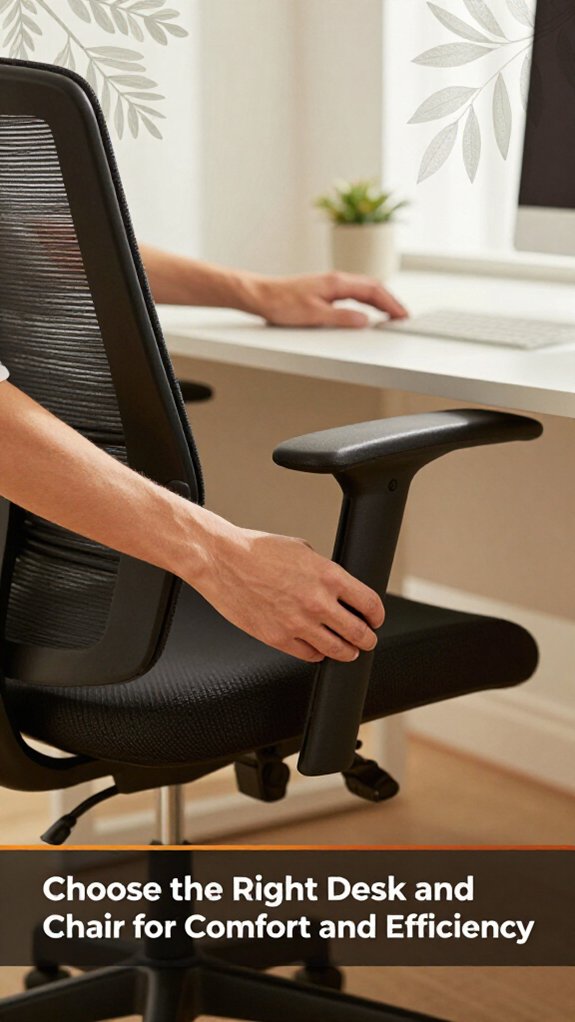
Choosing the right desk and chair might sound simple: go for a spacious desk, find a chair with decent back support, right? Well, that’s the theory. In reality, you’ll spend more time fiddling with height adjustments and cable management than you’d like.
1. Pick a desk that fits your space because it allows room for your essentials monitor, keyboard, maybe a plant.
2. Ensure the desk height allows your elbows to rest at a 90-degree angle because this position minimizes strain on your shoulders and wrists.
The height? It should let your elbows rest at a 90-degree angle because this reduces shoulder and arm fatigue.
3. Select a chair that supports your back no slouching.
4. Look for adjustable height, lumbar support, and breathable fabric. Because ergonomic features help maintain proper posture and reduce discomfort over long periods.
5. Mastering office chair ergonomics guides you to adjust your chair’s seat height, lumbar support, armrest position, seat depth, and recline tension to achieve a fully ergonomic seated position, which is crucial for comfort and long-term health.
Setting boundaries between your work and personal life isn’t just about flipping a switch and hoping for the best; it’s about creating a physical and mental separation you can actually stick to.
Start by defining your workspace clearly. For example, hang a curtain, put up a room divider, or designate a specific “work zone” on the floor. This physical marker helps your brain recognize when you’re in work mode.
It’s important to maintain these boundaries consistently. When you step out of that zone, avoid checking emails or bringing work-related items into your personal space because doing so blurs the boundary and makes it harder to disconnect. Consistency is key your brain benefits from the mini ritual of sealing off work mode.
Trust me, the guilt of a “work-zone invasion” will lessen over time, and your home life will stay, well, home. That’s the ultimate goal.
Highlighted Fact:
– To create a clear physical boundary, set up a dedicated workspace, such as hanging a curtain or placing a room divider, within your room.
Specific Measurement:
– Position your workspace so that it’s distinct from your personal area, for example, a separate corner or area marked with a rug or furniture barrier, ensuring mental separation.
Common Mistakes:
– *Inconsistent boundaries:* Checking work emails after hours or bringing work items into personal spaces makes it difficult for your brain to switch off.
Solution: Reinforce your workspace boundary by developing a routine that signals the end of work, such as shutting down your computer or folding a work designated item.
– *Vague physical separation:* Using unclear boundaries like a scattered desk without visual cues leads to blurred boundaries.
Solution: Use clear markers like a room divider or different flooring to signal the start and end of your work zone.
– *Ignoring the importance of a ritual:* Failing to create a transition between work and personal time causes overlap.
Solution: Establish a consistent ritual when entering and leaving your workspace, such as tidying your desk or stretching, to reinforce the boundary.
Implementing these specific strategies will help you maintain a healthier work-life separation, reducing stress and improving your overall well-being. Additionally, paying attention to ergonomic design principles, like proper desk height and monitor placement, will further support your comfort and productivity within your designated workspace.
There’s no shame in admitting that your home office can look like a bad Instagram wallpaper by Monday morning, if you don’t pay attention to lighting and color choices.
Start with lighting. Use natural light if possible, because it reduces eye strain and makes the space more inviting. Set your desk near a window to maximize natural sunlight.
Highlight: Position your desk so that the window is to your side or behind the monitor, not in front of it, to avoid glare. Don’t blind yourself; diffuse sunlight with curtains or blinds, because harsh direct sunlight can cause eye discomfort and glare on screens.
Next, add some warm artificial lighting. Use soft, warm bulbs such as LED bulbs rated between 2700K to 3000K for a cozy atmosphere.
Highlight: Place a desk lamp with a warm LED bulb on your workspace for focused light, reducing eye fatigue.
Now, concerning colors. Stick to calming tones light blues, greens, or neutrals because they promote relaxation and focus. Bright colors might energize you, but they can also be distracting, so use them sparingly for accents.
Highlight: Use paints like Benjamin Moore’s ‘Repose Gray’ (2211-60) or Sherwin-Williams’ ‘Sea Salt’ (SW 6204) for a calm, neutral environment.
Avoid harsh fluorescents; they strain your eyes because the intense, flickering light can cause headaches and eye discomfort.
Highlight: Replace fluorescent bulbs with LED lighting that provides consistent, flicker-free illumination.
The goal is to create an environment where you want to work bright enough and cozy enough without it feeling like a fluorescent-lit cave or a neon billboard.
Measurement tip: The ideal home office lighting level is approximately 300-500 lux, depending on your tasks. Use a light meter to measure illumination levels to ensure proper brightness.
Common Mistake: Using overly bright or harsh lighting that causes glare and eye strain.
Solution: Choose diffused lighting sources with warm color temperatures, and position lights to minimize glare on screens and work surfaces.
Common Mistake: Choosing vibrant, energizing colors exclusively, leading to distraction.
Solution: Combine calming wall colors with colorful accessories and keep the walls in soothing tones for a balanced environment.
Adding adjustable lighting controls can help tailor brightness levels throughout the day, enhancing comfort and reducing eye strain.
One good reason your home office feels more like a tangled jungle than a productivity haven is the endless spaghetti of cables sprawling everywhere.
You’ve probably been 45 minutes into plugging things in, only to realize that the power strip is behind the desk and your charger doesn’t reach.
All right, first, gather some cable ties or Velcro strips because they keep cables organized and prevent tangling.
Step 1: Loop your cables neatly and bundle them along the edge of your desk or behind furniture because doing so keeps cables out of the way and makes them easier to manage.
Step 2: Label each cable because when something needs unplugging in six months, you’ll thank yourself for easy identification.
Ensure the power strips are positioned close to where you need them most because this reduces cable length and clutter, and prevents a surge of cables dangling by strategically placing them.
Highlighted Fact:
The ideal distance for your monitor from your eyes is 20 to 30 inches for ergonomic comfort.
Splitting long paragraphs makes instructions clearer and easier to follow.
Common Mistake 1:
Using inadequate cable ties such as broken or thin plastic ties that snap easily and cause cables to fall apart, resulting in clutter and potential damage.
Instead, use durable, reusable Velcro straps or heavy-duty zip ties that hold cables securely over time.
Common Mistake 2:
Labeling cables vaguely with masking tape or not labeling at all, which leads to confusion when unplugging or troubleshooting.
Instead, write clear labels directly on the cable or using adhesive cable tags, indicating each device and purpose to save time and frustration.
Adding personal touches to your home office is a great way to make the space feel inviting without turning it into a cluttered eyesore. You want your workspace to inspire, not distract you know that’s where the line gets blurry.
Start with a few meaningful decor items, such as a favorite photo or a small plant something that makes you smile without dominating your desk. Place these items on the edges of your workspace, approximately 10 to 12 inches away from your keyboard and mouse, because keeping personal touches out of the immediate work zone reduces distractions.
Look, it’s tempting to add all the souvenirs from your last trip, but trust me, fewer is more. The goal is to personalize, not clutter.
Important: Don’t place more than three personal items on your desk, because overcrowding can decrease focus and increase visual clutter.
Create a cozy vibe by incorporating items like a decorative *succulent* or a small framed photo on a *corner shelf*, ensuring they don’t interfere with your workflow.
Measure your workspace:
If you want to work without feeling like you’re in a constant episode of “Hold My Silence,” tackling noise and privacy should be your first move.
First, invest in a good set of soundproof curtains, such as the Nicetown Blackout Curtains, or a thick rug like the Mohawk Home Prestige Collection Area Rug and trust me, it’s like turning down the volume on chaos. Because these help absorb sound waves and reduce echo, they effectively create a quieter environment.
Next, find a sturdy room divider or even a bookshelf filled with hardcover books to block sound and create a visual barrier. This helps to contain noise within your workspace and minimizes distractions from outside.
Install weather stripping on your door, because tiny gaps around the doorframe can invite every whisper and creak into your space. Make sure to measure the doorframe and apply a self-adhesive weather stripping such as Frost King Sealing Tape, fitting it along the top and sides of the door.
And don’t forget a headset, like the Sony WH-1000XM5 or Bose Noise Cancelling Headphones 700, because they provide a quick escape hatch from distractions and sound leakage.
Here’s the thing: Privacy isn’t just about blocking sound; it’s about creating mental boundaries.
Carve out a dedicated zone in your workspace, such as a corner with a specific desk and chair, and protect it fiercely.
Ensure your work zone has a door or partition that closes, which helps maintain your mental boundary and minimizes outside interruptions. A well-placed office partition can further enhance privacy and sound control.
You’ve probably spent enough time shoving papers and gadgets into random drawers, praying they’ll magically stay tidy, because they won’t. So, here’s the deal: install smart storage solutions upfront.
First, grab stackable trays or file organizers for papers, because they organize documents and prevent piles from collapsing.
Then, wall-mounted shelves are your friend hold your books, monitors, or tech gear without eating up desk space.
All right, don’t forget drawer dividers, because they turn chaos into order in seconds.
Now, use labels liberally, especially on clutter magnets, because clear labeling makes items easy to find and return.
I’m sure you’ve been 45 minutes into assembling something when you realize step 4 assumed something step 2 never told you.
Trust me, clear storage is your best investment because it keeps clutter manageable and reduces stress.
Important Measurement Tip:
Position your monitor so that the top edge is at or just below your eye level, which is approximately 48 inches from the floor for an average desk height of 29 inches.
Additional Storage Strategies:
Common Mistakes & Fixes:
Maintaining your bedroom office for long-term comfort isn’t about doing a quick cleanup once a month and calling it a day. It’s about consistency tiny tweaks that add up.
First, reassess your setup every few months because monitors can shift higher and keyboards can become misaligned after extended use or periods of laziness. Adjust your monitor to ensure the top of the screen is at or just below your eye level, typically around 20 to 30 inches from your face.
Next, keep cables tidy because cluttered cords can cause discomfort and distract from your work. Invest in cable clips or sleeves; your desk surface will thank you and reduce the risk of accidental disconnections.
Look, ergonomic adjustments aren’t one-and-done. Turn your chair slightly to align your hips and back to prevent asymmetrical strain. Tweak your monitor height as needed to keep your neck in a neutral position.
Add lumbar support to your office chair, such as a cushion or adjustable lumbar pillow, because proper lumbar support maintains the natural curve of your lower back and prevents pain.
These small fixes keep discomfort at bay and turn your setup into a comfortable haven no fancy gadgets required.
When you’ve spent enough time tweaking your setup, it’s easy to assume everything’s smooth sailing until you start noticing those little annoyances you never saw coming. You think the monitor’s at eye level? Not until your neck starts arguing with you at noon.
Now you need to adjust. Loosen or tighten the arm whatever it takes to get that sweet spot. Here’s the thing: measurements depend on your chair height, your desk, and your posture, so trust your eyes more than the manual.
Look, cable clutter is a common trap, so use clips or ties otherwise, you’ll soon have a spaghetti mess.
Troubleshoot smartly, stay comfortable, and keep your workspace ergonomic.
You create a professional space by dedicating a corner solely for work.
Get a good desk and chair forget that dining table, it’s a trap.
Keep your work essentials organized; nothing screams “amateur” like a cluttered desk.
Add good lighting preferably natural and hide distractions like laundry or toys.
And, obviously, keep it clean. Because if your workspace feels chaotic, your brain will follow.
Think of your space-saving furniture as puzzle pieces. Use a fold-down desk it’s like having a work surface that hides away when you’re done.
Opt for a tall bookshelf with closed compartments to double as a room divider.
Get a bed with built-in drawers or a loft bed, freeing up floor space.
All right, be prepared for some assembly, and remember, measurements vary so measure twice, swear once.
You’ve gotta set strict boundaries. When work’s done, shut that laptop, close the apps, and turn off notifications yes, even if it feels uncomfortable at first.
Allocate a specific work zone in the room and stick to it. Obviously, you can’t “turn off” the mind entirely, but you can train yourself to disconnect at a set time.
Work stops, personal time begins trust me, it’s a game-changer.
Think of your ergonomic accessories as the backbone of your home office ship. You’ll want an adjustable chair trust me, many an hour lost fighting discomfort.
Add a monitor stand or arm so your screen stays at eye level no more neck cricks. A keyboard and mouse with proper support keep your wrists happy.
All right, don’t forget a good footrest; it’s like giving your legs a vacation during long work hours.
You need to maximize your Wi-Fi strength in the bedroom? All right, first, place your router near the center of your space dropping signal in a corner is basically asking for trouble.
Then, elevate it off the floor dust, furniture, and interference love to mess with signals.
If coverage dips, consider a Wi-Fi extender or mesh network. Trust me, your late-night Zooms and Netflix marathons will thank you.
Alright, setting up your bedroom office isn’t rocket science, but it sure feels like it sometimes. Just remember, a good setup boosts your productivity by up to 45%, so it’s worth the effort. Don’t overcomplicate things start small, stay organized, and make sure your space feels right for you. Trust me, once you get it right, you’ll wonder why you waited so long. And hey, if I can do it without losing my mind, so can you.





